My Honest Review of MailerLite
This page contains affiliate links. When you click on and/or make a purchase through an affiliate link on this site, I may receive a small commission or other form of compensation at no additional cost to you. Please assume that any links contained on this website are affiliate links. Read my full disclaimer here.
MailerLite is an all-around great email marketing platform. While it seems to be geared towards business owners that are just getting started with email marketing, it’s also a great fit for people who have been in the game for a bit.
And without further ado, let’s jump right into it!

Reasons to love MailerLite…
Simplicity
By far, one of my favorite features of MailerLite is it’s simplicity. Maybe this doesn't seem like an actual feature but it's important enough that I count it! I use a lot of marketing technologies that are “easy-to-use”... but they really aren’t. MailerLite is easy to use, for real.
If you’re just getting started with email marketing, you will have more of a learning curve because you’re learning both a new piece of technology, but you'll catch up quick in this platform. As always, I recommend taking email marketing one step at a time and getting each piece set up, instead of trying to do too much at once.
Email Builder
I absolutely love the email builder inside of MailerLite! There are a few different options (including rich text and HTML if you're on a paid plan), but my favorite is the drag-and-drop builder. A lot of systems have a drag-and-drop builder but this one takes the cake.
The flow is incredibly intuitive once you get started. Choose from a huge library of blocks on the left (there are more than 70 blocks at the time of writing this!) and then simply grab it and drag it into your email. The variety of configurations makes it extremely flexible and I haven't run into anything that I can't do!
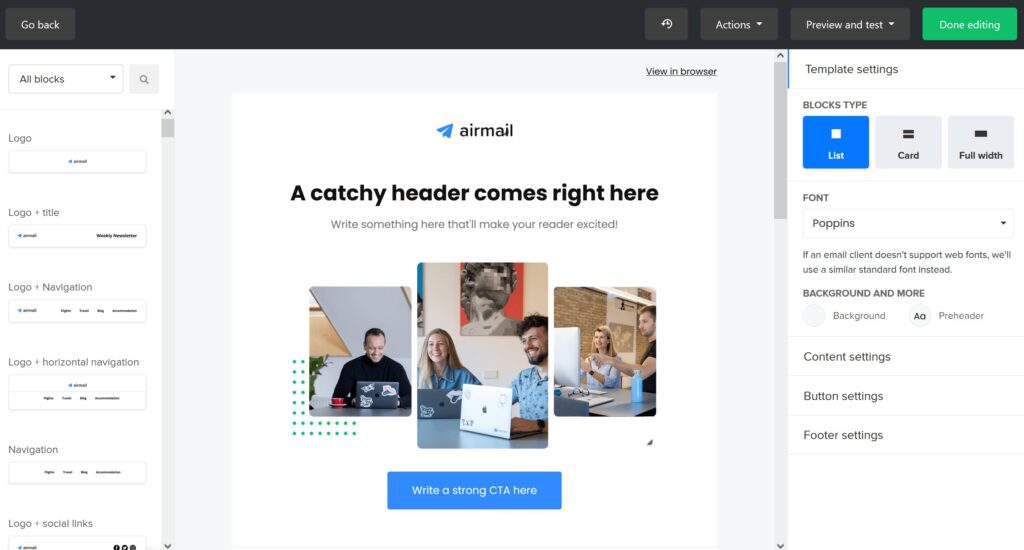
Once you have your blocks inside the body of the email, you can click on an individual block and edit the content and settings in the panel on the right. This is where you can customize your email until you're satisfied! Each block has settings for color, spacing, typography, link styles, button styles, you name it.
Going back to the simplicity of the system, take note of the various options throughout. One of my favorites while designing is applying your style changes throughout an email. For example, if you have 5 button blocks throughout your email and you decided to make an update, such as the button color, you don't have to update each button block individually. There's a one-click option to update ALL of the buttons in the email. This is such a time saver!
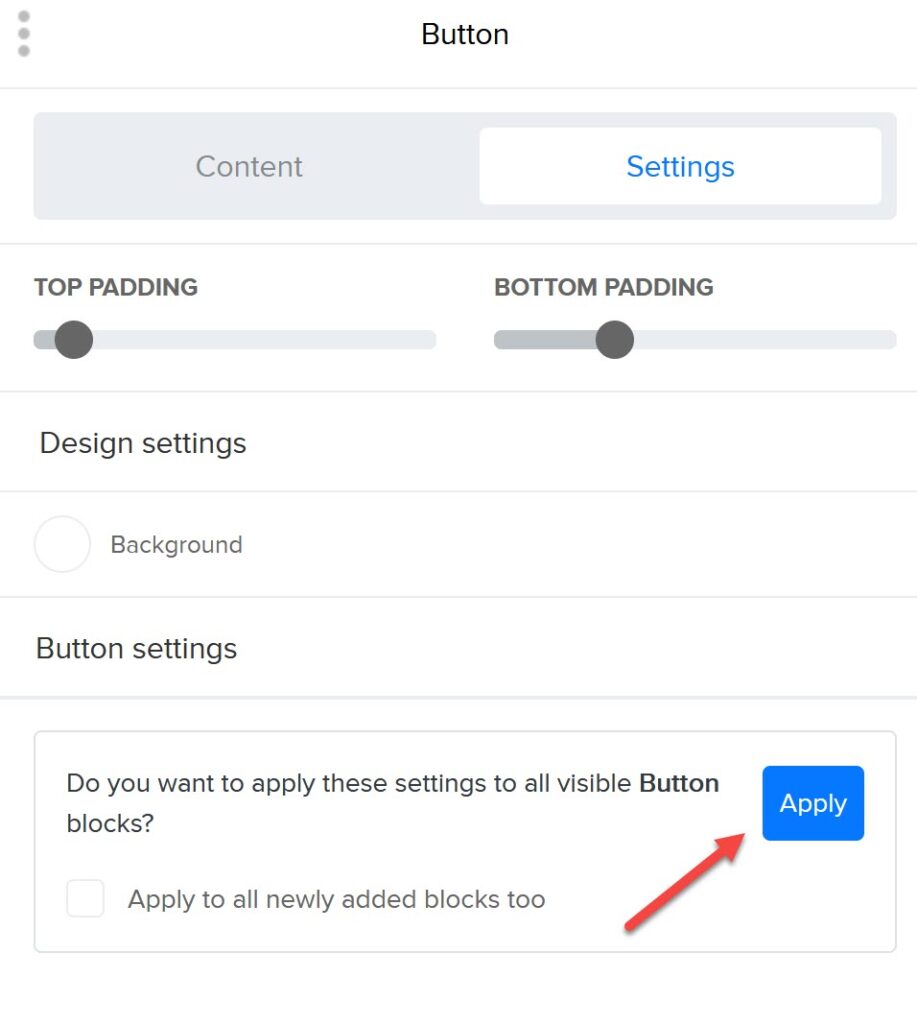
And, of course, I need to mention templates. If you build out the perfect email with blocks and styling, you can save it as a template so that you can select it as a starting point any time you build a new email! This is especially helpful when you have multiple product offerings or brands and have a specific email style for each.
Pricing
It’s one of my favorite things when I can list pricing as a benefit. MailerLite has one of the best free tiers EVER when it comes to email marketing platforms. A lot of systems are "14 days free", "30 days free", "free for 300 subscribers", or even "here's a free tier but severely limited functionality", but MailerLite is different.
Their free tier is:
- Truly free forever up to 1,000 email subscribers (which is a big number when you're getting started!)
- Access to almost all functionality except a few advanced options (like auto-resend which you'll grow into using later)
- Includes email support (their support team is great)
And if you decide to upgrade to get some of the advanced features, it's only $10/month! Yes, really. When other systems are starting at $20, $40, or even $70 per month for basic plans, you can see how much more affordable MailerLite can be. And once you pass 1,000 subscribers, it's only $15/month.
So if budget is a concern as you're getting started with email marketing, MailerLite is the way to go.
Custom Fields
Although I wouldn't consider MailerLite a full CRM, it definitely has a good framework for adding custom fields and managing data. The piece that sets MailerLite apart for me is that you can specifically add dates as a custom field. Why is this important?
If you add a date, for example a subscriber's birthday, to a custom field in a system that can only handle text fields, that date cannot be used for anything meaningful OR has a convoluted set up to make it useful. In MailerLite, you can add data like birthday as a date and then use that information to trigger an automation. And in this case, you can do this as an anniversary (trigger every year on that month/day) or as an exact match (trigger on month/day/year that you set).
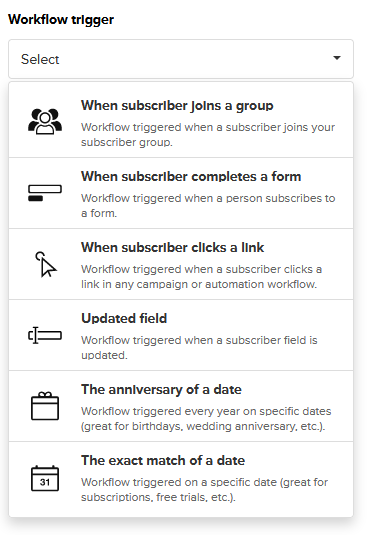
You may not need features like this right away, but it's certainly a bummer when you do need it and it's not a built-in function! While you're evaluating your email marketing needs, make sure to think ahead to "I want to do something like that in the future" to see if little details like this are necessary for you and your business.
Automations
Most email platforms either already have or are introducing visual automation builders. Personally, I think MailerLite's automations are so straightforward!
If you're new to email marketing, automations are the beauty of email marketing. You want to automate as many emails as possible but in a thoughtful way. For example, if someone signs up for your email newsletter, your first automation should probably be a short welcome email. You can think of automations like IF/THEN statements. IF someone signs up to my newsletter THEN send a welcome email. Automations can be much more complex than that but that's a great way to get started!
MailerLite has a simple flow builder which is really intuitive. You start by choosing one of six triggers to start, and configure the exact settings for that. Continuing the newsletter example, I could easily select "When a subscriber joins a form" and then select a form I created such as "Website newsletter opt-in."
From there, you add steps sequentially and includes things like:
- Sending emails
- Delay steps (wait 5 days before continuing)
- Branching/conditional logic
- Update a subscriber's groups, data fields, or active automations
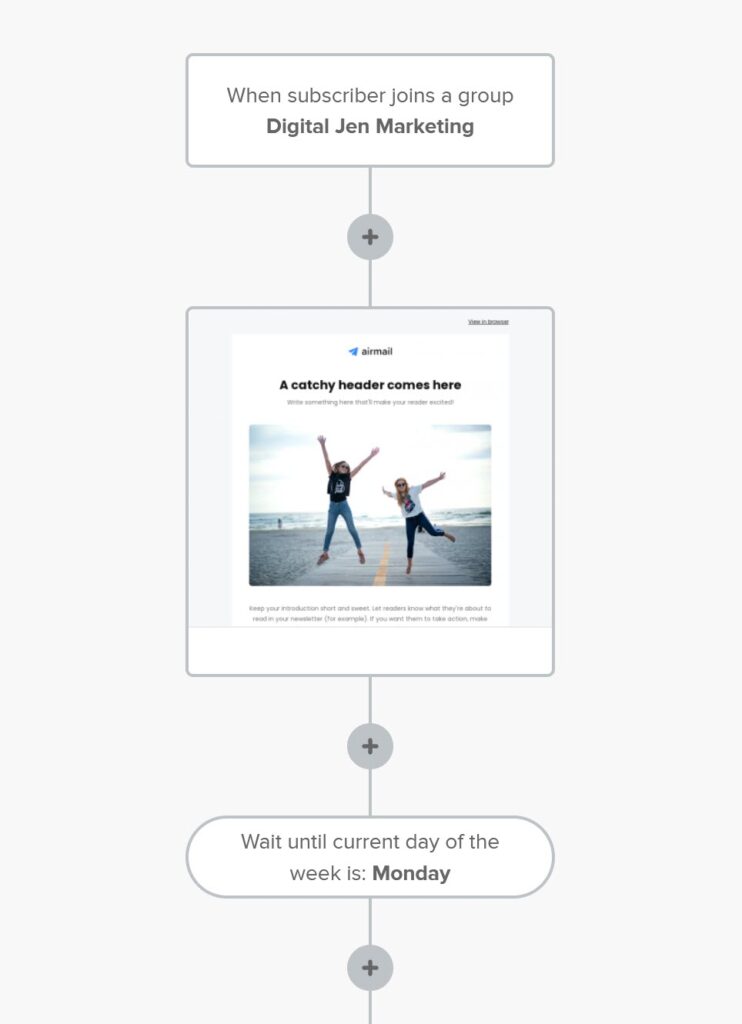
None of these options are novel, but the way they are combined and structured is what sets this system apart from the others.
Forms/Pop-ups
One thing I find lacking in some systems are the flexibility of forms and pop-ups. Because email platforms are, surprise surprise, primarily an email marketing platform, the functionality for forms and pop-up building is lacking. I find myself recommending other standalone form building platforms simply for ease of use and customization. However, I don't have this issue with MailerLite!
The forms and pop-ups inside of MailerLite has plenty of ways to customize the layout, design, and functionality in a streamlined way that it's perfect. There are limits to the number you can have while on the free plan, but you probably don't need more than one of each while you're on the free plan anyway. By the time you're ready to introduce more forms/pop-ups, you'll hopefully be above 1,000 subscribers and on the paid plan!
A little less love for MailerLite because…
Integration Limitations
Since MailerLite hasn't been as mainstream as some of the other email marketing platforms, I'm more often to run into "this platform is perfect, but it doesn't integrate with (an important system I need for this scenario)". The team at MailerLite has really ramped up the number of native integrations that are available, so this is becoming less of an issue, but it's still frustrating when in happens.
Of course, there are integrations with Zapier, Automate.io, and other connectors like that to create integrations where they don't exist, but there's an additional cost there. If one of the reasons you might be looking at MailerLite as your email marketing system is for the pricing, it defeats the purpose to then pay $25/month for Zapier to connect it to a system you need to communicate with.
So, as with any platform, make sure to think through which integrations you need and which are nice-to-have but not required to make sure that your email marketing platform can connect in the way you need it to.

Limited Complexity
The one downside to the simplicity of MailerLite is that it does seem to be limited in the complexity that you can build out. Even though it is the perfect fit for small to medium email lists, once you get a large list (my definition is 40,000+), I would recommend taking a look at a platform like ActiveCampaign instead.
I'm sure you could set up MailerLite to be a great system for a large list but at a certain point, the benefits of having a full built-in CRM outweigh the benefits of simplicity. You most likely have someone (or multiple people) assisting you with marketing at that point (or you should consider it!) and they can manage the more complex system.
If you're starting from scratch with your email list, it will realistically take a while to get to this point, so don't worry about this too much for now! Transferring to a new system down the line isn't as scary as it might sound.
Overall Review of MailerLite
Based on the pricing alone (free tier!) and then taking into consideration the amazing feature set, you can probably see why MailerLite is by far the platform I recommend most often for businesses that are just starting their email marketing or in the process of growing their email list.
This amazing platform will take you a long way with your email marketing with an easy-to-use system, beautiful email templates, and flexible features. So, what are you waiting for? Sign up for MailerLite and see for yourself!
If you do want to look at two other platforms, check out my reviews of ConvertKit and ActiveCampaign: