My Honest Review of ConvertKit
This page contains affiliate links. When you click on and/or make a purchase through an affiliate link on this site, I may receive a small commission or other form of compensation at no additional cost to you. Please assume that any links contained on this website are affiliate links. Read my full disclaimer here.
ConvertKit is a solid email marketing platform that can be a great fit for either beginning email marketers just starting their list or those who already have a healthy email list and looking for more control over segments.
Now let's take a look at both the pros and cons of using ConvertKit!

Reasons to love ConvertKit…
Tagging
A lot of people are introduced to ConvertKit because of it's tagging and segmenting abilities, which is one of its best features. One of the most common questions I get asked is, what are tags and how do I use them?
The simplest way to explain a tag is that it is a piece of data about a subscriber. That data can be used in so many different ways that I think about it in a few different buckets.
- Lead Source: If you have an email collector on your website, two landing pages with a freebie, and an integration with a sales platform, you probably want to know where your subscribers are coming from. The simplest way is to add a tag for each entry point to your email list.
- Behavior: If a subscriber does something specific (e.g. click on a link in an email you sent), you can tag them as being interested in that topic or product. This allows you to re-engage with them later in a more targeted email that you already know they are interested in.
- Customers: This one is fairly straightforward; if someone purchases a product or service, you should tag them! This way you can filter them out of email communications about something they already bought and you can up-sell/cross-sell other related items they might be interested in.
- Functional: As you start to build automations, one of the ways to start one is with tags. This is always my preference since the entire system runs smoother if you always start with a tag. I also track milestones such as "Completed Welcome Sequence" or "Currently in Sales Funnel" so that I can be careful about how many emails someone is receiving at one time.
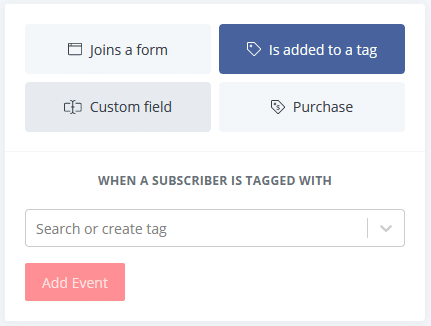
You can create as many tags as you need so my general rule is, if you aren't sure, make a tag! You can always delete them later if you truly don't need the data, but it's much more difficult (and often impossible) to go back and add tags for something you weren't tracking initially.
Segmentation
Now that you're familiar with tags, we can talk about segmenting your audience. This is the true value of tagging your audience because creating a segments allows you to send the right message, to the right person, at the right time. This is truly the key to email marketing!
So what is a segment in ConvertKit? A segment is a combination of various pieces of data including tags, location, behavior, and subscription date. Here are a few hypothetical examples to help conceptualize what these could be:
Segment 1: Subscribers that have completed your 5-day welcome sequence AND are interested in learning more about your online course.
Segment 2: Subscribers that downloaded your e-book AND have not yet purchased your online course on a similar subject.
Segment 3: Subscribers that have clicked on a link to your membership site AND have not signed up yet AND have already completed your online course.
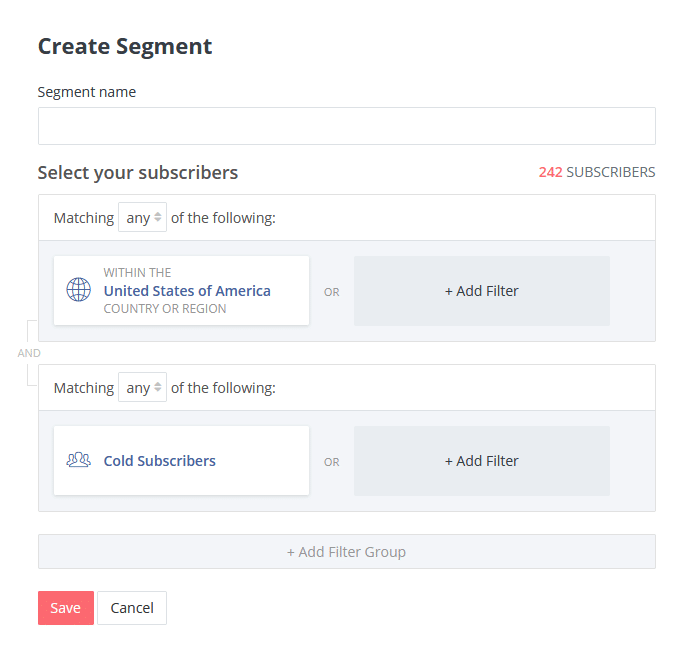
Segments will be tailored to the offerings of your business and vary quite a bit. Instead of trying to specifically develop segments, I find it much easier to think about "who do I want to send this email to and why?". Once I have that figured out, then the task is "what pieces of data can I combine to isolate that group of people on my list?" and that's typically much easier.
Growing / New Features
Even though ConvertKit has been around for quite awhile, they've been going through massive growth, meaning lots of new features and development. While it can be disconcerting to log in and see changes to the interface, it's nice to know they are growing!
ConvertKit is based around creators of all types whether that means bloggers, artists, musicians, course developers, or any other type of creator you can think of. As a result, their new features are geared towards, you guessed it, creators! There's been a lot of focus on increasing the flexibility of certain features, adding more templates and design elements to work with, and adding integrations to monetize your email list right inside the system.
Text Based Emails
The email builder inside of ConvertKit is much simpler than other platforms. ConvertKit's initial philosophy was that your email text should be the primary focus since that is what truly delivers value. That's not to say that you can't do design (you can!) but it will feel much different than other builders.
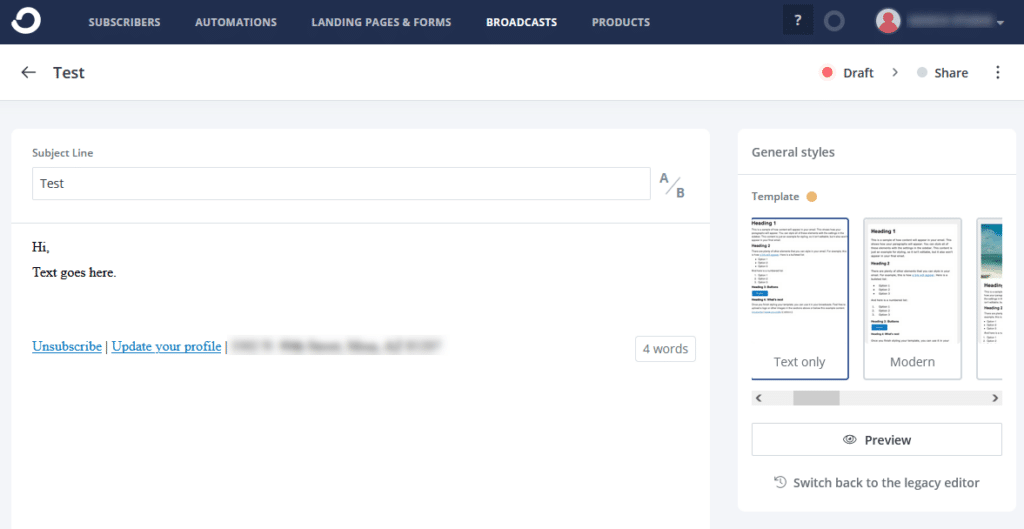
In this system, you start with a template. There are default templates built in or you can create your own, both using the standard builder or with a full custom HTML template. If you opt for a more standard template, you can change basic settings such as font, default colors, spacing, a header image, and a few other things. When you build each email, some of these can be overwritten (like a button color) but most of the settings (like the width of the email) will continue to be set by the template. You can have multiple templates to choose from.
Everything else is set up while you are building an email. You start with your text and can add images, bulleted lists, galleries, links, tagging your link clicks, and more from inside the builder. Everything flows in one column (for the most part) so it's a simple way to build out your emails.
A little less love ConvertKit because…
Text Based Emails
Yes, this is both a pro and a con! While having text based emails can make email marketing simpler since you are focusing on the text content, it can be frustrating when your business is highly visual. For example, if you're a photographer or a graphic designer or generally want to have an email with lots of design elements, it can be challenging to present the visual elements the way you want them. Recently there have been more visual elements introduced but it's still not as flexible as a drag-n-drop builder.
Although ConvertKit does allow for HTML templates to make a custom design, they can only go so far since individual emails cannot be imported as HTML. What this means is that you cannot design an email in a third party system and simply import it like you can in other system. All of the content needs to go in the body of the email and the HTML template goes around it.
If you do have an HTML template you like and enjoy the ConvertKit builder, it works well until you need to change the template or create a new one. Unless you know HTML and CSS yourself (or have a team member that does), you will likely need to pay for someone to make even small changes to the template. Might not be a huge deal but it's worth mentioning!
While I always recommend testing a new platform thoroughly, if you go with ConvertKit, I highly recommend that you test the email builder first! This can be a deal breaker for a lot of businesses.
Large Lists
This isn't documented anywhere on ConvertKit's site but rather something I've encountered several times while working inside of different accounts. Once your email list hits a certain point (I notice it around 50,000 subscribers), there are some features that either don't work quite right OR take a long time to process. The two that I have noticed which can be frustrating:
- Segments may time out when editing them. When you build out segments, you are pulling in lots of data and there are times where the filters you set are so complicated, the system takes too long to process your request in the data base. When you have a smaller list, it's a non-issue, but when it's a larger list it becomes apparent. You will start to get an error message that doesn't have a lot of information but also doesn't let you proceed. It seems to be less of an issue lately as they continue to optimize their system but it's maddening when it does this!
- Processing bulk actions takes a long time and you can only process one. You might not need this often but when you're building out automations or cleaning up your email list, you may need to re-tag several thousand people at a time or update a field of data. While this is possible, it takes a long time to process when you are working with that large of a list and you cannot queue up multiple actions. It's not a deal breaker but does tend to interrupt my workflows while building to let things process.
When looking at a large email list, I typically recommend ActiveCampaign because of the additional features and functionality, but it all depends on what you need for your email marketing! ConvertKit may still be a great fit for you.
Custom Fields
ConvertKit is set up as an email marketing system, not necessarily a CRM, which is clear with the way custom fields are set up. I won't spend a ton of time on this one because most people won't need it, but if you set up a custom field to contain a date (like an anniversary date or birthday), that data is being stored as a text field, not as a date field. What this means is you cannot trigger an automation based on a date (like each year on someone's birthday). Not a deal breaker for most but worth mentioning!
Reporting Limitations
In general, email marketing platforms limit their reporting capabilities and often have a separate tier for "custom reporting" but there's typically a solution. However, I find that ConvertKit has limited reporting regardless of whether you are on the base plan or the Creator Pro plan.
Of course there are basic stats such as number of recipients, open rate, click rate, and the number of unsubscribes, as well as seeing which links were clicked and by whom, so that is plenty to get you started. However, if you wanted to filter the stats of an email sequence based on when someone clicked the link (say, before a certain date) you won't be able to.

There are also limitations with looking at engagement. If you are on the base plan, you can see "cold subscribers" but it is set to mean this: "If a subscriber never engages in a single email (opens or clicks) in the first 30 days after being confirmed, they will be classified as a cold subscriber. If they do engage with even at least one email at all, the minimum requirement of being listed as a cold subscriber now bumps to 90 days since the last engagement." And no, it can't be changed. Even with the Creator Pro subscription, there are star ratings (1-5) but you cannot change how they are defined.
While some other platforms don't have built in lead scoring, you can typically filter by opening certain emails or clicking certain links to find your most engaged audience. In ConvertKit, you unfortunately cannot sort data in this way.
Landing Page and Form Builder
If you currently work in ConvertKit and you struggle with the form and landing page builder, trust me, it's not you, it's definitely them. During consultations, I often tell people that are struggling with landing pages to keep in mind that ConvertKit is an email platform with a landing page builder added in. Landing pages aren't their primary goal and you can really feel that.
To their credit, they did try to make it easy to use with templates, and they've added quite a few options to choose from, but the downside is you are locked to the template you choose. It is not a drag-and-drop builder and the features that are in the template are the ones you need to use. There are some places you can add more content on a page, but not throughout. Similarly, if you want to delete a section, you cannot. You don't need to add content to it, but there may be blank space on the page where that content was supposed to be.
If you happen to know CSS styling, you can correct some of these issues by hiding sections entirely, but it's not perfect. I also find that most small business owners don't know CSS (why would you?) so they are dependent on someone else styling their landing pages if they want them just right.
That being said, the pages are great if you need a limited number of them OR need a page spun up quickly, even if it's not the exact design you were planning. However, if you use a lot of landing pages, it may be worth it to invest in a standalone landing page builder, use your website to create the pages, or check out a platform like MailerLite which has a much more flexible builder in landing page builder.
Overall Review of ConvertKit
As you can probably see, I have mixed feelings about ConvertKit. It's a solid platform and you can build a good email marketing system from it, but it's not for everyone! If you prefer more technical platforms that are both powerful and has a learning curve, ConvertKit could be a great fit for your business.
While I always advocate doing research and testing a system before deciding it is the backbone of your marketing, I especially believe this when it comes to ConvertKit. If the feature set is what you need, then give it a shot! You can sign up for ConvertKit and give it a test run. Important note: you don't have access to automations on the free plan (which is usually what people are looking for) so I would sign up for the mid-tier for a month to evaluate all of the features before making your decision.
Want to see a few other email platform options? Check out my reviews of MailerLite and ActiveCampaign!