Fundamentals of Double Opt-In Emails
This page contains affiliate links. When you click on and/or make a purchase through an affiliate link on this site, I may receive a small commission or other form of compensation at no additional cost to you. Please assume that any links contained on this website are affiliate links. Read my full disclaimer here.
Okay, time to talk about the double opt-in email. In the email marketing world, a double opt-in email is used to confirm somebody's email address. So, when someone submits their email address on your landing page, website, or any other form, you might expect them to be automatically added to your email list. However, you’d be wrong.
Most email marketing platforms are set up to send the double opt-in email (for my friends using ConvertKit, they call it an “incentive email”) by default. What this means is as soon as someone signs up, they are sent a confirmation email but are NOT added to your email list. They must click on the link in the email before they are become part of your list of subscribers. What if they don’t click on it? You can’t email them again… not your newsletter, not a resend of the double opt-in email, nothing.
Maybe you are wondering, what’s the point of that? The main driving factor behind them is the GDPR law from the EU. GDPR focuses on data privacy with a huge emphasis on consent before being tracked or added to an email list. I am not a lawyer and this is not legal advice, but if you send emails to people in the EU (even if you are located elsewhere), you need to comply with GDPR regulations. There are a lot of nuances but also a lot of resources available online!
Benefits of the Double Opt-In
What if your audience is 100% in the United States, do you still need double opt-in emails? There are two other benefits that come along with using them…
Primarily it'll keep your list super clean. What I mean by clean is you won't have a lot of spam email addresses, because a spam email address will sign up through your form, but it won't click through on the link in the double opt-in email.
A lot of spam email addresses are simply bots or other automated ways that people submit forms throughout the internet and typically aren't associated with a real person or email address. So, it's always good to keep these off your list.
Another benefit is that it does lead to higher email engagement. If somebody submits a form AND they also follow through by clicking on the email that you send, it does indicate that they do truly want to be on your email list. Since you are essentially screening people, you should have a more engaged email list with higher open and click rates. This is always a positive thing and what we are trying to accomplish with email marketing.
Downsides of the Double Opt-In
However, one thing I do want to point out with double opt-ins, specifically with an audience that is inside the United States, you do have the risk of losing part of your engaged audience simply because it is an extra step in the process.
For example, if I'm browsing your website or downloading your freebie and I put in my name and email address I might think to myself, “Hey, I'll go check that out later”. And of course, with the crazy pace of society these days, we may get distracted and not necessarily think about checking that email right away. And if you’re anything like me and on tons of email lists, by the time you do check your email, you may have forgotten about that particular download that you originally wanted. It ends up getting lost in your inbox amongst hundreds of other emails or somehow ends up in your spam folder. Ultimately, we don't click on the link and therefore never get added to the list.
This is important enough to repeat again in case you missed it earlier: If a subscriber does not click on the link in the double opt-in email, they do not get added to your list.
Obviously, this is a clear downside of using the double opt-in. Therefore I typically advocate for somebody that is just starting their list, especially if they are under 1,000 subscribers, to disable the double opt-in email.
If you do choose to turn off double opt-in, make sure you aren’t breaking any rules such as GDPR. There’s no point building an email list by breaking those rules. However, if you’re in the clear, go for it! If your list becomes bogged down with spam addresses, you can always turn the emails back on.
Choosing to Use Double Opt-In
After reviewing the pros and cons (and taking EU subscribers into consideration), if you decide to use double opt-in emails, please please PLEASE make sure to change the default email content.
When any email marketing platform sets up a standard email, it has to work for literally everyone. It’s the default for all industries, all sizes of businesses, all styles of email… meaning it’s actually not ideal for anyone.
If you're thinking “it can’t be that bad”… oh, it is. When you’re focused on branding and engagement with your emails and then leave the default double opt-in, here’s what you’re in for.
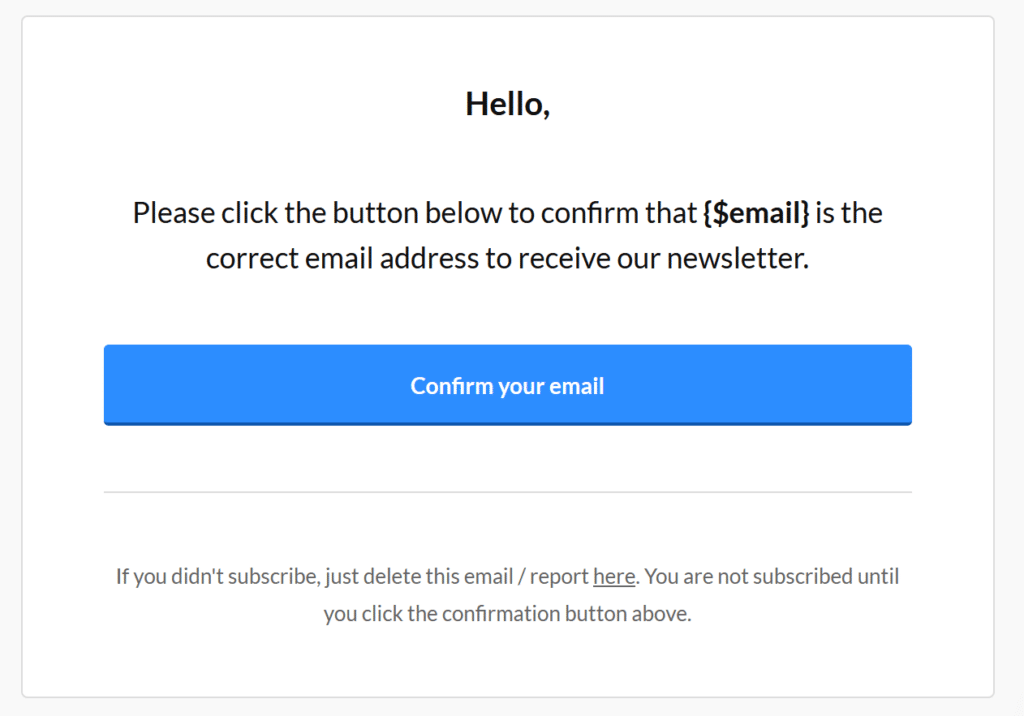
Check out the standard from MailerLite:
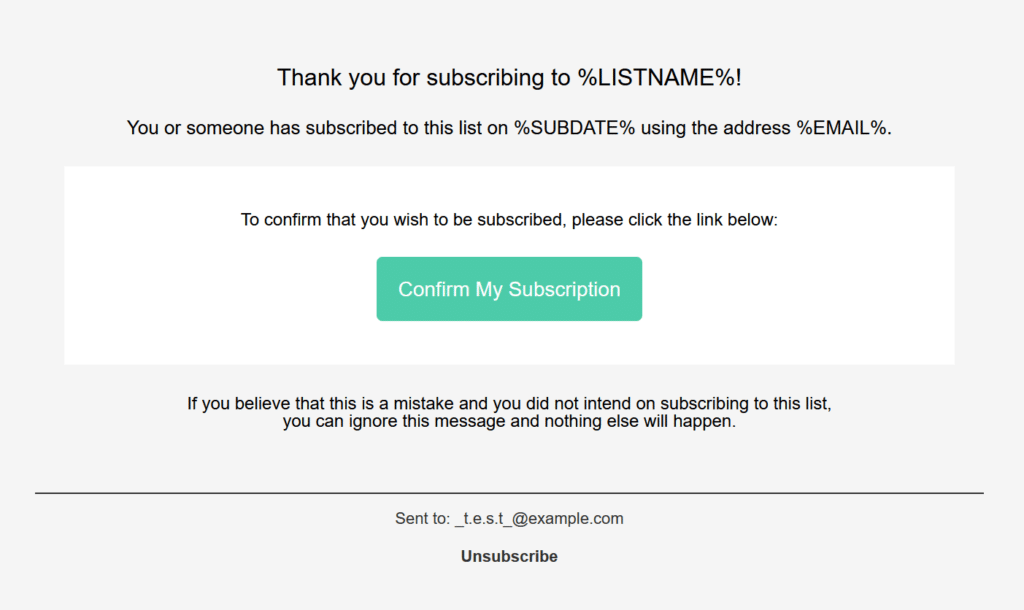
Look at this one from ActiveCampaign:
And here’s the default from ConvertKit:
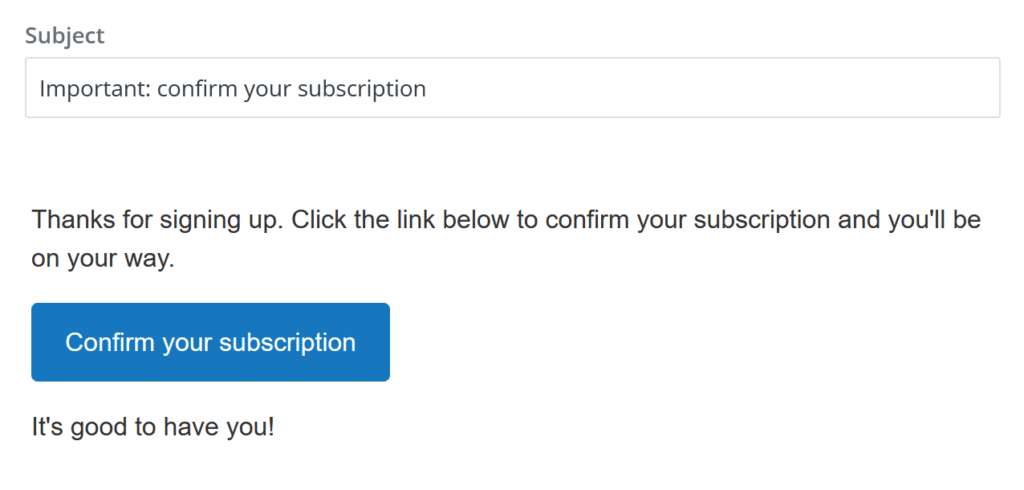
Be honest, unless you work for one of these companies, do ANY of these look like your brand or sound like how you would speak to your subscribers?
Don’t get me wrong, I love all these email platforms (check out my reviews here) and I know they needed to create some type of default content for these emails, but most people don’t know to change them. In the case of ConvertKit, your default template will pull through to the email which you might have already customized with your logo, colors, and any other branding, but a lot of people haven’t done that either. Overall, it's a recipe for giving your subscribers a really strange experience right from the beginning.
Updating Your Double Opt-In Email
Here are the bare minimum changes I would make for each email:
- Change the subject line. Defaults often say “confirm your subscription” which is extremely confusing for someone signing up for a free download. You might automatically disregard it thinking it’s either spam, an unwanted email (“I signed up for a free download not a subscription”), or something that needs to be paid. A subject line as simple as “Here’s your free guide!” will make a world of difference. If you want it to be obvious that they are confirming their information, you could even say “Get your free guide and confirm your email address”. Remember, if you use double opt-in and they don’t even open this email, they never get added to your email list.
- Update the email text. If you don’t want to write a full new email, at least change the text to be more on brand to your normal tone and, if you sign your other emails, add your signature to this one too.
- Add a new landing page URL. Unless you are delivering a free download upon clicking the button in the email, there’s a default link for each email platform that your subscriber will see once they are confirmed. Spoiler alert: these pages are terrible. Even if you send someone to your homepage with no additional information about being added to the email list, I prefer that to the default. Even better though would be to create a simple landing page (either in the email platform or on your website) that says “Awesome! You’re on the list."
Those are three minimum changes I would make but here are a few more to make this first email touch point with your subscriber more impactful.
Write a full email. It doesn’t have to be anything too fancy and you don’t want to take away from the main goal of clicking on the link, but this is the perfect place to explain the free download you’re sending them or say what they can expect from being on your list (e.g. “two emails a month packed full of resources and tips for you to use right away!”).
Build an experience for your subscriber. Instead of using a simple landing page with only some text, think through where you want them to go next. Do you want to promote a free social group they can join? Is there a video you posted that you think they would like? Should they check out your most recent blog articles? You already have their attention, use it to help them get to know you better!
Make sure your branding is on point. Add a logo, update the color of the button/link, and anything else that’s important for your brand. Remember to keep the focus on clicking the button though!
To Opt-In or Not
Clearly there are several considerations to take into account with double opt-in emails. Some businesses will be required to use them, others it will be optional, but if you are using them make sure to use them well. So, are you off to check your email marketing settings and see where you're at with double opt-ins? I hope so!
If you are just getting started with email marketing and are in the process of deciding which platform to choose, check out my honest reviews of MailerLite, ConvertKit, and ActiveCampaign for a starting point!